
No products in the cart.
-11%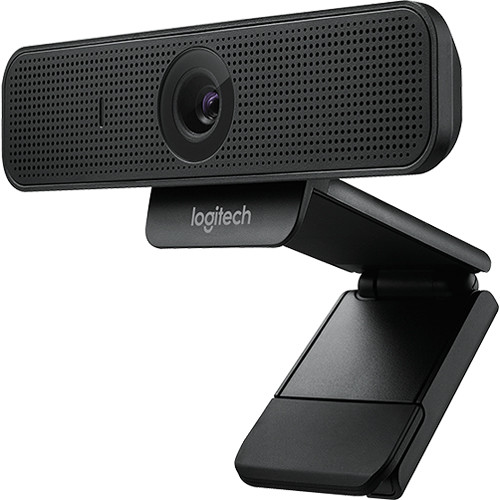
Video Conferencing Solutions, Webcams
Logitech C925e Business Webcam 960-001076
- Crystal-Clear Video: Full HD 1080p/30fps and 720p/30fps video resolution.
- Lighting Optimization: RightLight™ 2 auto-light correction for poor lighting.
- Privacy Included: Built-in physical privacy slider to block the lens instantly.
- Pro-Grade Audio: Dual omni-directional stereo mics with noise reduction.
- Field of View: Fixed 78° diagonal field of view—ideal for personal desktop setups.
- Plug & Play: Universal USB-A connection with H.264 video compression.
KSh 12,500.00 KSh 14,000.00
Logitech C925e: High-Definition Video for Professional Collaboration
In the modern era of hybrid work, video quality directly impacts your professional image. The Logitech C925e Business Webcam is purpose-built to deliver high-quality, reliable, and secure video conferencing for professionals working from home, open office spaces, or corporate conference rooms. Featuring high-definition 1080p glass lens optics, hardware-based video encoding, and advanced light management, the C925e ensures every meeting is seamless and sharp.
1. Full HD 1080p Video with H.264 Hardware Compression
Make a lasting impression during critical client calls, team huddles, and live presentations. The Logitech C925e streams and records in full 1080p high definition at 30 frames per second. Utilizing onboard H.264 with Scalable Video Coding (SVC) and UVC 1.5 encoding technology, the webcam processes video data internally rather than relying heavily on your computer’s CPU. This prevents computer slowdowns, reduces network bandwidth consumption, and guarantees smooth video playback even over constrained Wi-Fi connections.
2. Intelligent Lighting with RightLight™ 2 Technology
Lighting conditions in home offices and workplace environments are rarely ideal. Whether you are sitting in front of a bright window, working under harsh fluorescent office lights, or dialing in from a dimly lit room, the C925e automatically adapts. Logitech’s proprietary RightLight™ 2 technology continuously monitors ambient lighting and dynamically adjusts brightness, contrast, and exposure to keep your face looking natural and clearly visible at all times.
3. Perfect Framing with a 78° Diagonal Field of View
Wide-angle lenses often capture cluttered backgrounds, messy desks, or unwanted room details. The Logitech C925e features an optimized 78-degree diagonal field of view. This ideal focal angle frames you and your immediate workspace perfectly—offering a natural head-and-shoulders perspective without distorting room proportions or forcing you to clean your entire office before hopping on a call.
4. Integrated Hardware Privacy Shutter
Security and personal privacy are paramount in any work environment. Unlike webcams that rely on external plastic clip-ons that easily get lost, the C925e features an integrated physical privacy slider built directly above the lens. With a simple slide of the switch, you physically cover the camera lens, giving you absolute confidence that your camera is inactive when you are off the clock.
5. Clear Stereo Audio with Dual Mics
Avoid muffled sound and annoying background distractions. The C925e is embedded with dual omni-directional microphones situated on either side of the camera lens. Engineered with noise-suppression algorithms, these microphones capture clear, natural speech from up to one meter away while actively filtering out background keyboard clicks, ambient room noise, and HVAC hums.
6. Business-Certified Compatibility & Easy Customization
Skip complicated software installations and driver downloads. The Logitech C925e features a standard USB-A plug-and-play design compatible with Windows, macOS, and Chrome OS. It is officially certified for Microsoft Teams, Zoom, Skype for Business, Google Meet, and Cisco Webex. For deeper custom adjustments, pair the camera with the free Logi Tune Desktop app to fine-tune digital zoom, color balance, firmware updates, and manual focus adjustments.
Technical Specifications
| Feature Category | Specification Details |
|---|---|
| Max Video Resolution | 1080p / 30 fps (Up to 1920 x 1080 pixels) 720p / 30 fps (Up to 1280 x 720 pixels) |
| Focus Type | Autofocus |
| Lens Type | Glass Lens |
| Diagonal Field of View (dFoV) | 78° |
| Digital Zoom | 1.2x (Adjustable via Logi Tune) |
| Auto Light Correction | RightLight™ 2 Technology |
| Built-in Microphones | 2 Omni-directional Stereo Mics |
| Microphone Pickup Range | Up to 3 feet (1 meter) |
| Video Encoding | H.264 AVC / UVC 1.5 with Scalable Video Coding (SVC) |
| Connectivity | USB-A Plug-and-Play (USB 2.0 / USB 3.0 compatible) |
| Privacy Feature | Built-in Physical Privacy Lens Slider |
| Mounting Options | Universal monitor clip (fits laptops, LCD monitors) + Standard 1/4″ Tripod Thread |
| Cable Length | 6 feet (1.83 meters) Attached USB-A Cable |
| Dimensions & Weight | Width: 4.9 in (126 mm) | Height: 2.9 in (73 mm) | Depth: 1.8 in (45 mm) | Weight: 6.0 oz (170 g) |
| System Requirements | Windows 8 or later, macOS 10.10 or later, Chrome OS, USB-A Port |
What’s in the Box?
- Logitech C925e Business Webcam with attached 6 ft (1.83 m) USB-A cable
- Integrated Adjustable Monitor Mounting Clip with 1/4″ Tripod Thread
- User Documentation & Warranty Information
frequently Asked Questions (FAQs)
Does the Logitech C925e work with Zoom and Microsoft Teams?
Yes. The Logitech C925e is officially certified for Microsoft Teams, Zoom, Google Meet, and Skype for Business. It works seamlessly as a plug-and-play USB camera across virtually all major video conferencing applications.
Can I mount the C925e on a tripod?
Yes. In addition to the universal adjustable clip that fits securely onto laptops and desktop LCD monitors, the base of the clip features a standard 1/4-inch threaded screw hole for mounting on desktop tripods.
Is the privacy shutter removable?
No, the privacy shutter on the C925e is built directly into the top bezel of the camera casing. It slides smoothly across the internal glass lens, ensuring you never lose your privacy cover.
How does the C925e compare to the Logitech C920?
While both capture 1080p video at 78°, the C925e is built specifically for business environments. It includes an integrated privacy shutter, onboard H.264 SVC encoding to save CPU resources, dual stereo mics, and business software certification.
Based on 0 reviews
Be the first to review “Logitech C925e Business Webcam 960-001076”
Related products
- Video Conferencing Solutions
Logitech Tap IP Controller
Logitech Tap IP Controller
- Display: 10.1-inch touchscreen, flush-mounted
- Compatibility: Microsoft Teams, Zoom Rooms Scheduling Display, Meetio, Robin
- Mounting Options: Glass, mullion, and wall mounts included
- LED Indicators: Colored LED lights for room availability
- Power and Data: PoE Type 1, Class 3, IEEE 802.3af
- Management Platform: Logitech Sync
SKU: 952-000085 - Video Conferencing Solutions, Webcams
Logitech C270 HD Webcam with Built-in Microphone
- HD 720p video calling and HD video recording
- Supports 2.4 GHz Intel Core2 Duo, 2 GB RAM,200 MB hard drive space
- Crisp 3 MP photos Technology,Hi-Speed USB 2.0
- Compatible with: Windows and Mac O.S
- Built-in mic with noise reduction
- Automatic Light Correction.
SKU: 960-001063 - Video Conferencing Solutions
Logitech Tap IP Wall Mount
Logitech Tap IP Wall Mount
- Mount Logitech Tap on a Wall
- HDMI Cable Clip and Dock
- Provides 14° Display Angle
- Cabling Exits on Back and Bottom
- Mounting Hardware Included
- Wall Mount offers a dependable mounting solution with maximum productivity
- Space Saving Design feature for maximum efficiency and convenience
- Wall application/usage allows adaptability with easy installment
SKU: 939-001817 - Video Conferencing Solutions
Philips PSE0500 Portable USB Wireless Bluetooth Speakerphone
360° stereo sound pickup for full-room coverage
4 sensitive microphones with 4-6m pickup distance
48kHz sampling rate for high-fidelity sound
Intelligent noise reduction and digital echo elimination
Bluetooth wireless and USB connectivity
Multi-port design for expanded range and device flexibility
Powerful sound amplifier with rich and clear output
SKU: n/a



There are no reviews yet.